Skip to content





Picture this: You have got a stack of R scripts — perfect little data-crunching, web-scraping gems — and a client who is adamant they need to run inside Azure Data Factory. One problem: ADF does not speak R.
What do you do?
In this article, I will let you in on how to run R scripts on Azure. Read along to see how I turned this puzzle into a slick, cloud-powered solution using Docker, Azure Functions, and a dash of ingenuity.
Buckle up, this is a tale of bending tech to your will.
The challenge: R meets a cloud roadblock
Let’s set the scene. The client, a data-driven outfit with a knack for scraping websites and wrangling messy datasets, lives and breathes Azure Data Factory (ADF).
It is their go-to for orchestrating pipelines, syncing Blob Storage with SQL databases, and keeping everything humming. But their secret weapon? R scripts.
These were not just any scripts, though. They were lean, mean machines powered by packages like rvest for scraping and tidyverse for slicing data like a sushi chef.
Here is the hitch: ADF, for all its brilliance, has no native way to execute R. You can fling Python around with Databricks or a Custom Activity, sure. But R? It is like asking a vegan restaurant for a steak — great place, wrong menu.
The client wanted these scripts triggered dynamically, with parameters like file name or storage account names passed in, all within ADF’s cozy pipeline interface. Oh, and it had to be cost-effective; no spinning up a $500/month Databricks cluster for a few R lines.
So, I dug into the docs. ADF offers a Web Activity to ping HTTP endpoints, an Azure Functions Activity for serverless vibes, and a Custom Activity for Batch jobs. None screamed R-ready. Databricks could hack it with SparkR, but that would be an overkill. Batch could work, but configuring R there would be a nightmare. The clock was ticking, and I needed a fix, fast.
The lightbulb moment: Docker + Functions App to the rescue
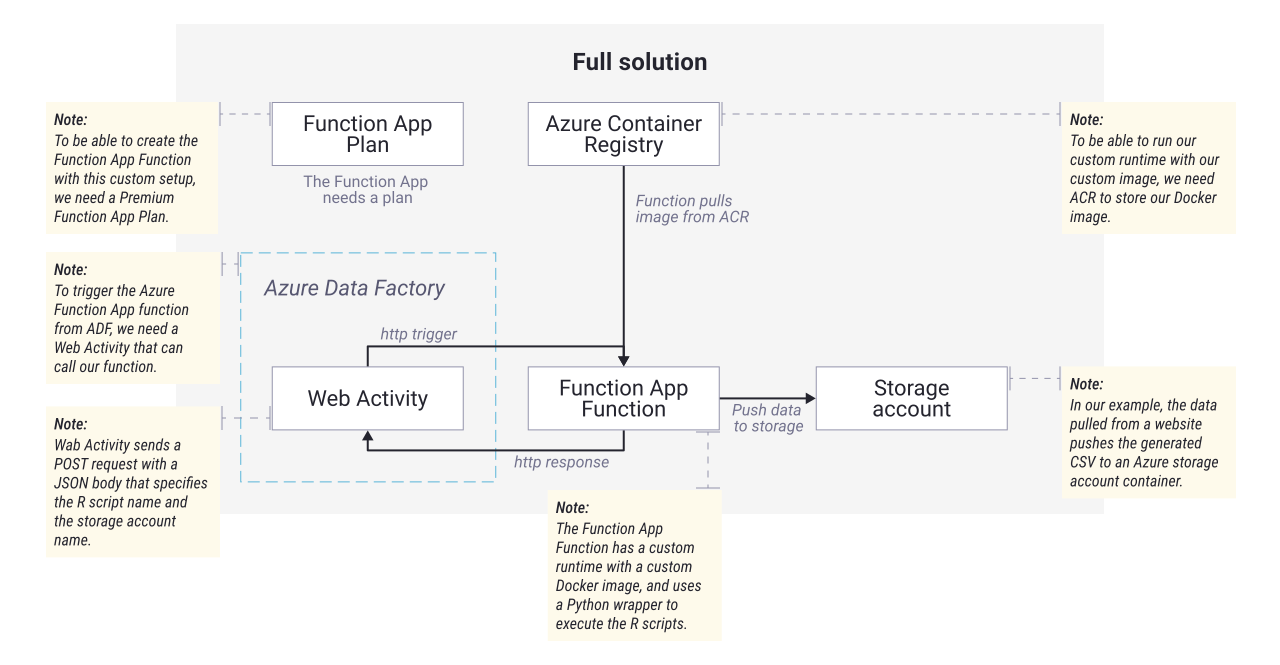
Here is where the magic happens. I realised Azure’s flexibility could save the day if I thought outside the ADF box. My plan: build a custom Docker image packed with R, pair it with an Azure Function App, and let ADF trigger it via a Web Activity. It would be like giving ADF a translator that says, “Hey, I’ll handle the R part, you just push the button.”
Step 1: Crafting the R-powered Docker image
First, I grabbed mcr.microsoft.com/azure-functions/python:4-python3.10, a rock-solid base image from Microsoft directly. This is basically a pre-built image for functions with Python.
I spiced it up with:
Packages: Installed collected in packages.txt via a quick RUN R -e "install.packages(...)" in the Dockerfile. These cover data processing and web scraping like champs;
System goodies: Added libssl-dev, libcurl4-openssl-dev, libxml2-dev, and r-base with apt-get to keep those R packages happy;
The glue: Wrote a tiny Python script, __init__.py, inside the function folder to act as a intermediary. It takes http request args (e.g. script name, storage account), runs the target script, and pushes out results to the specified storage account.
I tossed in a folder of sample scripts (e.g. scrape_data.R to pull data from websites), built the image (docker build -t azregdev.azurecr.io/adf-trigger:1.0 .), and pushed it to Azure Container Registry (ACR). Boom! R in a box, ready to roll.
Step 2: Azure Functions as the trigger
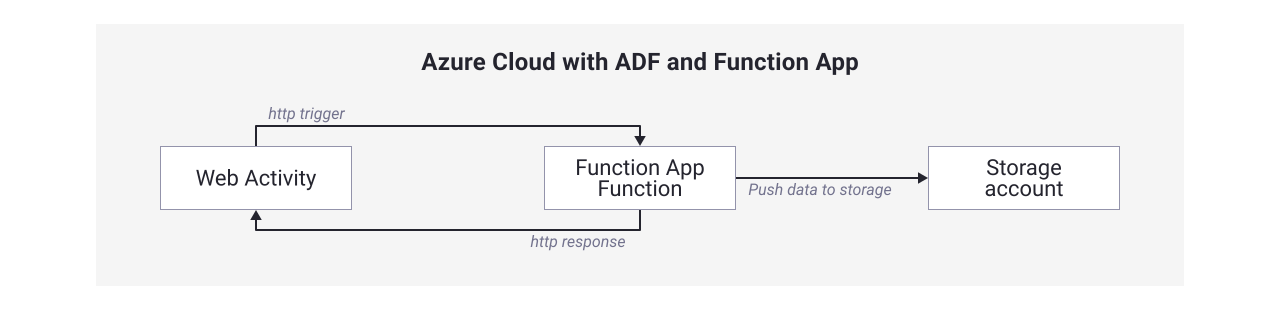
Next, I spun up an Azure Function App with a custom container runtime, pointing it to my ACR image. The function was a simple HTTP-triggered Python script (Python is just the bouncer, while R does all the heavy lifting):
- How It works: Grabs a JSON payload from the HTTP request (e.g. { "script_name": "scrape_data.R", "storage_account": “mystorageaccount”});
- Execution: Fires off Rscript /home/site/wwwroot/Rfunction/scripts/execute_r_script.R, using Python’s subprocess;
- Output: Captures the R script’s stdout and sends it back as an HTTP response and pushes the output data to an Azure Storage Account.
I deployed it, tested it with a curl call, and watched it scrape a webpage like a pro. The Function App scales automatically, costs pennies per execution, and sits there quietly until called.
Step 3: Hooking it up to ADF
Now, to the final piece: ADF’s Web Activity. I dropped it into a pipeline, set the URL to my Function App’s endpoint (e.g. https://r-runner.azurewebsites.net/api/Rfunction), and configured a POST request with a dynamic JSON body.
ADF passes in pipeline parameters like a URL from a Lookup Activity, pings the function, and the R script runs. Results are dumped to Blob Storage. It is seamless, like ADF grew an R arm overnight.
Why this rocks and what is next
This set up is a significant improvement:
- Flexibility: Swap scripts or tweak params via the HTTP body, no redeploying;
- Cost: Functions’ pay-per-use beats spinning up Batch or Databricks. Think $0.20/million executions plus compute time;
- Scalability: Docker ensures R runs consistently, and Functions handles load spikes.
Could it be better? Sure. Long scripts might hit the 5-minute Function timeout (extendable to 10), and error handling leans on R script quality.
Next steps? Maybe a status endpoint to monitor runs.
R scripts on Azure: the takeaway
When Azure says “no R in ADF,” do not take it lying down. With Docker, Functions, and a little elbow grease, you can make the cloud dance to your tune.
The client’s R scripts are now scraping and processing away, all orchestrated by ADF like it was meant to be.
Got a wild tech challenge? Sometimes, the best solutions are the ones you build yourself.
If you found this article helpful, head to the Infinite Lambda Blog for more.