Skip to content





Model Context Protocol (MCP) is an open protocol that standardises how applications provide context to LLMs. You can think of MCP like a USB-C port for AI applications.
With the success of GenAI in the consumer space, there is no shortage of tools and adapters to connect to AI applications. Generally, there are three types of patterns that one can choose from to make their own tools available to an LLM via the ReAct framework:
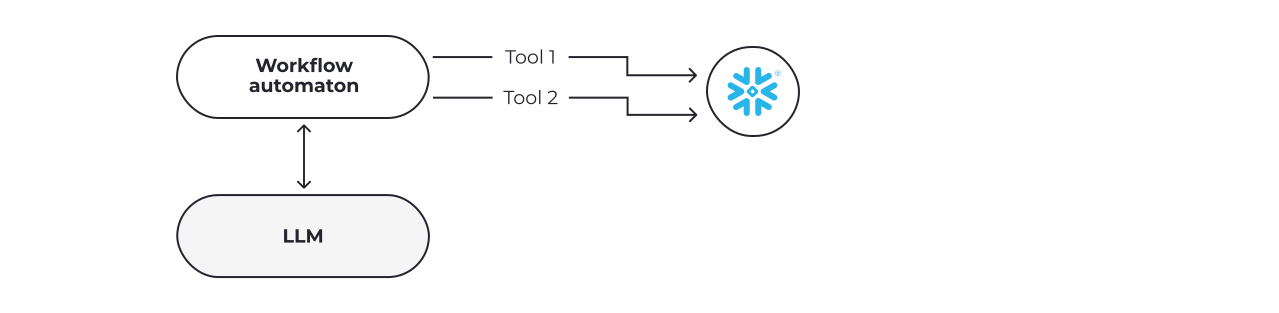
- Workflow automation: Similarly to n8n, workflow automation offers a wide range of predefined functions for major technologies like Slack, Google Calendar, and Snowflake. Many of them also leverage Gen AI capabilities as part of their offerings. This allows tool calling with no or very low code.
- Open protocol: MCP is an open-source protocol, which is adopted by most LLMs and allows developers to write once and run everywhere. This removes the need for users to wait until a certain LLM support and feature is rolled out in the adapter. Moreover, an enterprise proprietary stack could add an MCP server for LLM to leverage even on premises. For adapters, this is still either impossible or prohibitively costly.
- LLM-specific function calling: OpenAI, for example, offers function calling interfaces, both as standalone or as a package in assistant. Users write a wrapper function around their tools, and register this function as a context. Both the function definition and registration are proprietary, and only work for that particular LLM.
Having this context in mind, we are now going to take a deep dive and compare the three patterns above to help readers decide on the best way to move forward, based on their unique requirements.
We will also discuss the recent announcement of the Agent-to-Agent (A2A) protocol, and the impact this may have on MCP architecture.
Agentic workflow with Snowflake
Snowflake being central to many enterprise systems, we have chosen it as an example to illustrate the three patterns in agentic workflows.
The task is simple: given the openly-available sample database and schema, a user would ask the LLM to return the top 10 orders by value.
Here is a visual comparison in terms of the 3 patterns.
The workflow automation pattern has the workflow at the centre of orchestration, as shown below:
The open protocol pattern uses the LLM’s ReAct (Reasoning and Acting) capability as the centre of orchestration, and go through a protocol like MCP:

And finally, in the LLM-specific function calling pattern, the Snowflake call is tightly coupled into the LLM.

Let’s see how to implement each of these three patterns with Snowflake.
Experiment setup
In all three of our experiments, we will be using the following publicly available dataset from Snowflake:
- Database: SNOWFLAKE_SAMPLE_DATA
- Schema: TPCH_SF1
- Table: ORDERS
We will also be using Claude Sonnet 3.7 as the LLM across the board.
The problem statement is to find the top 10 orders and sum them up. The agent shall support blue-sky conversation, and be able to trigger the tools with high precision and recall.
Human performance of the above renders a sum of $5,246,556.17, which we expect to get from all three patterns.
Workflow automation
We have chosen n8n as the showcase, as its no/low-code solution makes it ideal for automation. For this experiment, we are wiring up the Claude Sonnet 3.7 from AWS Bedrock, and connecting it to the Snowflake sample database.

We also have the Slack bot as the entry point for a data-intensive query:

Let’s break down what happened there. A workflow has been set up in n8n from а Slack trigger. When there is a question posted to the n8n bot, the message is passed on to the AI Agent, which is connected to the Claude 3.7 Sonnet via AWS Bedrock.
Memory is provided for more context, and a tool is registered to access Snowflake’s database with valid credentials to run a query.
The LLM uses a ReAct flow to generate the SQL query, which is then sent to Snowflake for running. The result is then reasoned and acted upon by the LLM to produce a final response.
The challenge of the UI is that when we craft the actual SQL query, we can only use extraction from the input JSON. If we had a dynamic query, it would require some additional steps, which would not be trivial.

n8n is perfect for automating workflows when you need some AI functionality. However, crafting a dynamic query from a blue-sky conversion would not be trivial.
Open protocol: MCP
Let’s now rerun the same conversation using MCP with Claude. We have built the demo locally on a Mac using the following:
- MCP server: Locally hosted server with a Python environment and packager uv installed, which exposes an MCP tool called read_query;
- MCP client: Claude desktop app on Mac with a configuration file specifying the command on spawning the server above;
- LLM agent / MCP host: Claude Sonnet 3.7 with extended thinking running ReAct.
The architecture looks like so:

MCP agility comes in two parts:
- MCP protocol: Controlling the communication between the MCP client and the server, and the discovery and invocation of tools (e.g. functions exposed to LLM with a description like checking weather or querying Snowflake) in a fully standardised, interoperable manner;
- Custom implementation: providing the actual functionality of a tool, which could be implemented using any libraries and technologies.
Please note, the above represents only 1 single tool call. Some questions could involve multiple tool calls before an integrated answer.
LLM agent with MCP client
In our experiment, we will use the Claude Desktop, which acts as both the LLM and the MCP client. We star by wiring up the MCP server onto the desktop configuration file:

Above, you can see that we have successfully registered the read_query to Claude Desktop, which allows the LLM to execute a SELECT query into Snowflake database.
The LLM is thus empowered to query the Snowflake database, if its reason and act flows deem that such an action is necessary.
So let’s throw in the same question as in our previous experiment: “Can you list out the top ten orders? Give me the total sum.”

This experiment has produced the same result with less assistance and more blue-sky capability.
MCP Server
MCP Protocol
Since MCP is an open standard, there are a number of community-led efforts to build an MCP server for Snowflake. In our experiment, we opt for one of those openly available MCPs. You can find a list of open-source MCPs for Snowflake in the appendix.
An MCP server is a request / response server, which also implements the following for each tool:
- list_tools(): Clients can list available tools through the tools/list endpoint;
- call_tool(name, arguments): Tools are called using the tools / call endpoint, where servers perform the requested operation and return results;
Consider the example of list_tools() below:
List_tools() would expose the tools with each tool’s unique name, description and input schema. The LLM will always call the list_tools() first to register the tools with their information.
This simplifies the tools’ discovery; for example, the read_query tool’s description will be ‘Execute a SELECT query,’ and it will stay in the context of the LLM in order to make invocation a viable action. When the LLM decides to call the tool after matching the description with the current reasoning, it will proceed to call_tool(name, arguments).
Below is an example of call_tool(name, arguments):
Call_tool(name, argument) would allow the LLM to call the tool with arguments. For example, calling a read_query tool will run the SQL query, and write the results back to the LLM in a structured format.
Custom implementation
The handler itself would belong to a custom implementation. For example, in the handle_read_query, the MCP server will use a Snowpark library to create a valid session, run the SQL query, get the result in Panda DataFrame, and then write back in a format which the LLM can read (both in YAML and JSON), which allows each LLM to consume in its preferred format.
Here the YAML will be wrapped in a TextContent, and the JSON will be populated with an EmbeddedResource. The LLM can then read these responses and integrate back into the ReAct flow.
Write once, run everywhere
We can use the MCP server, snowflake_local, against other LLMs apart from Claude, for example, OpenAI. Here, we can see how the SDK agent in OpenAI could add the same MCP server and extend its Snowflake capabilities:
LLM-specific function calling
Strong coupling
The third pattern, LLM-specific function calling, provides a strong coupling between the LLM and the function call:

By removing the MCP server and protocol, all the communication between user and LLM would go through a proprietary protocol with custom implementation.
Example prompt via Claude function call
Finally, let’s rewrite our prompt in Python with Claude’s specific tool calling.
The user would need to maintain a handler in their code base, in case the LLM decides to make use of the available tools. The handler will take the input query, which will always be provided by the LLM.
Example prompt via OpenAI function call
The syntax is similar in OpenAI:
Wiring multi-LLMs efficiently
The above examples demonstrate the inefficiency in wiring multi-LLMs, which is increasingly common nowadays.
Unlike MCP, the developer would have to write different wrappers to register functions, each in a proprietary protocol, with Claude and OpenAI respectively. If we are to wire more LLMs in the future, the inefficiencies will continue to swell.
Comparing the 3 patterns of ReAct tools
All three patterns are based on the ReAct framework, which allows the LLM to reason and act iteratively, before giving the final response. Querying Snowflake is a common use case in enterprise applications, and we have seen that all three patterns do work.
Each approach comes with its pros and cons. We have compared them in the table below to offer an overview.
| Workflow automation (e.g. n8n) | Open protocol (e.g. MCP) | LLM-specific function calling (e.g. OpenAI, Claude) | |
| Framework | ReAct | ReAct | ReAct |
| Language support | No-code | Python, TypeScript, Java, Kotlin, C# | Python, Java (Claude), JavaScript (OpenAI) |
| Registration | By adding a node | By adding to the client config file | Require registering to the LLM on every completion |
| Discovery | By description, which is string based | By description, which is string based | By description, which is string based |
| Filling Input schema | Queries are mostly static; it would require more work to extract the input schema for a dynamic query. | Minimal effort in filling input schema | Minimal effort in filling input schema |
| Invocation | Determined by LLM in run time | Determined by LLM in run time | Determined by LLM in run time |
| Confusion | Increase with number of tools, especially with similar name | Increase with number of tools, especially with similar name | Increase with number of tools, especially with similar name |
| Coding effort | Lowest | Medium | Highest |
In a nutshell, all three patterns are similar under the hood and rely heavily on the ReAct framework and the LLM capabilities. Adapters are easiest to code (sometimes requiring zero code), but it is not trivial to extract the correct input schema for the query. MCP and LLM-specific tool calling are more powerful, and reveal the full capabilities of the LLM in deciding on the tool to call, when to call it, and with what parameters.
Perhaps the biggest challenge remains the confusion related to an increase in the number of tools, especially those with similar names. Calling the wrong tool (i.e. a precision problem), or not calling the tool at all (i.e. a recall problem) could affect the user experience in getting a satisfactory final response.
MCP definitely reduces the level of coding effort, and its core interfaces (list_tools and call_tool) are easy to follow and understand. MCP always has strong cross language support, although most MCPs available in the open-source world are coded in Python or Typescript.
ReAct empowers the LLM to do things that have not been possible until recently, giving it access to numerous tools. Adapters like n8n enable simple automation tasks, and for anything beyond that, MCP is increasingly becoming the de-facto standard in exposing your capabilities to the LLM.
Regardless of the approach you opt for, make sure to limit the number of tools available to the LLM at runtime, and provide detailed text descriptions. This would minimise the risk of the LLM getting confused.
Finally, ReAct depends heavily on the reasoning capability of the LLM, strongly favouring larger models.
Right now, you should aim to use top-end models when leveraging MCPs. Of course, should anything change because of a breakthrough, we will revisit this piece of advice.
Adding A2A to MCP
Google’s recent announcement of A2A is rather a supplement than a competitor to MCP. While MCP makes tools (ReAct agents in particular) available for LLMs, A2A allows communication between two agents, often across different LLMs.
Communication between two agents can allow a multi-agent workflow, which may provide more performance gain in certain problems.
In a recent article titled “AgentCoder: Multi-Agent Code Generation with Effective Testing and Self-optimisation”, Dong Huang and team outline the benefits of a multi-agent workflow when:
- Each agent has well-defined roles and responsibilities, suc as coder vs. test-designer vs. test executor;
- Each agent is given different contexts and goals, and allowed to focus on each specific task;
- There is a small number of agents, ideally 3 or fewer;
- Agents are drawn from different LLMs.
Having this in mind, it is exciting to see how A2A can allow for multi-agent workflows, especially across different LLMs where the performance gain is more significant.
Currently, A2A is not supported by major LLM clients like OpenAI and Claude, as the library and SDK are less developed as compared to MCP. A possible solution is to leverage the MCP for tool calling, while leaving A2A for the necessary multi-agent workflow only:

Although the above may position A2A as a perfect supplement to MCP, the actual picture is more nuanced. With the rise of specialised agents, which comes with deep expertise in calling and exposing one single tool, the line between A2A and MCP will start to blur.
Developers may soon be able to choose between calling Snowflake as a tool via MCP and calling a Snowflake agent via A2A. You can see that in the diagrams above, where both LLMs can access Snowflake via MCP.
Hence, if LLM agent 1 decides that LLM agent 2 is more powerful with Snowflake, it may opt for calling via A2A instead of calling the tool directly itself.
Recommendations
The landscape of AI-powered enterprise systems evolves so fast that the choice of integration pattern is no longer a purely technical decision but a strategic one.
Workflow-automation platforms like n8n can quickly unlock low-code wins, and proprietary function-calling APIs deliver deep, model-specific control. Yet, it is open protocols like MCP and, increasingly, A2A promise the greatest long-term flexibility by decoupling critical data assets and specialised agents from any single vendor or model.
As GenAI use cases mature and tools ecosystems grow, interoperability will come to matter as much as raw model capability. Designing today for open standards and clear, well-scoped tool definitions not only reduces engineering effort, but also future-proofs architectures for the multi-agent, multi-model world that is coming next.
Appendix
Open-source MCP implementations for Snowflake:
- https://github.com/isaacwasserman/mcp-snowflake-server
- https://github.com/dynamike/mcp-server-snowflake
Other MCP servers useful for enterprise applications:
References
- Model Context Protocol Specification (MCP on GitHub)
- OpenAI Function Calling (OpenAI)
- Claude Function Calling (Anthropic)
- n8n Automation Workflow
- AgentCoder: Multi-Agent Code Generation with Effective Testing and Self-optimisation (Dong Huang et al.)